


We have all deployed AEM Technology stack in our projects, picked the right modules to deliver the functionality we require and customize its various components.
To provide an excellent solution on AEM, we should have a reasonable understanding of how it is architected and the various components of the AEM Technology stack. This article here discusses AEM internal architecture from v6 of AEM.
Before we deep dive in, we’d like to cover some of the terminologies we will be using freely in our architecture explanation below:
OSGI
OSGI stands for Open Services Gateway Initiative, a set of specifications that define a dynamic component system for Java. It enables a development model where an application is composed of several components packaged in bundles. These components communicate locally and across the network through services.
There is also a service registry to list components and discover other components in the ecosystem. The AEM uses a OSGI container called Apache Felix.
JCR
JCR is the Content Repository API for Java (JCR), a Java API specification for unified access to content repositories. AEM uses the Apache Jackrabbit Oak for creating a fully content storage repository for all content authored on AEM.
AEM Stack
AEM enables users to author, manage and share content with various other applications within the enterprise. It furthers provides a way to store and expose content to other applications and users.
AEM provides a REST-based API that clients can consume programmatically to access the various capabilities of AEM. This API layer exists on top of the AEM content repository and exposes the content.
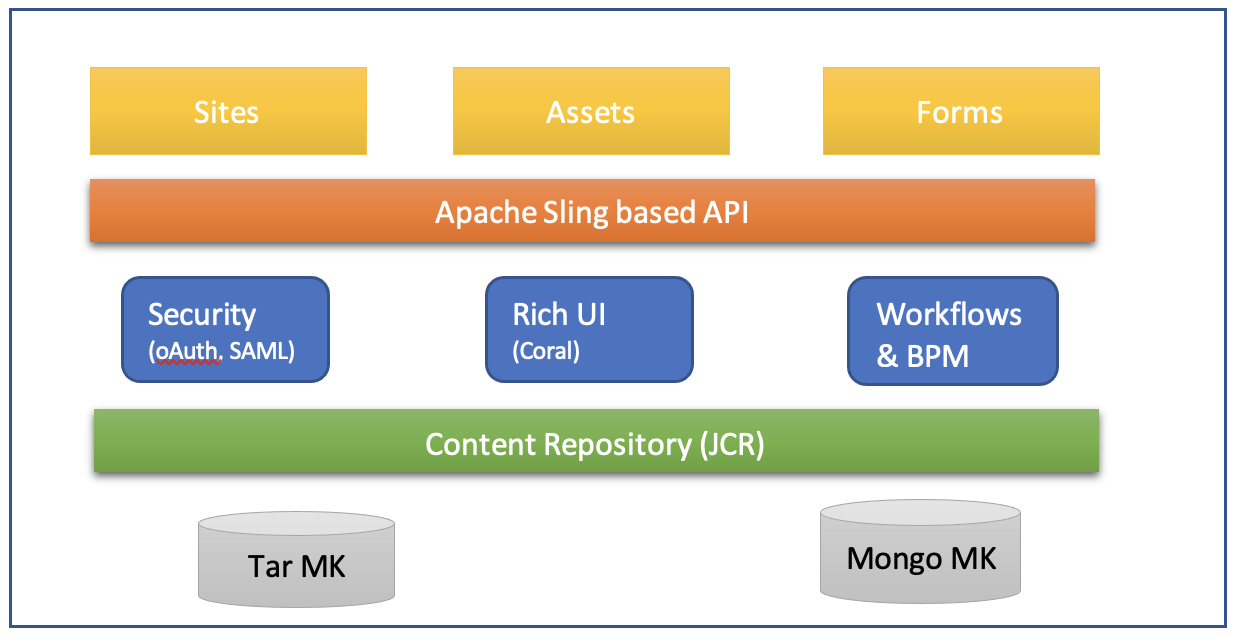
Open source Stack employed
The content repository is built on top of the Apache JackRabbit and the API layer is built on top of Apache Sling. Jackrabbit Oak further supports two main storage methods, TarMK and MongoMK, for storing content data at rest.
TarMK is a set of tar files that stores the content as diverse types of records within larger segments. To track the latest state of these repositories, Journals are used.
On the other hand, MongoMK is built on top of MongoDB the opensource NoSQL database. A MongoMK is usually deployed in a larger site, where data has to be sharded and clustered to manage the huge volumes of data.
AEM Implementation
The API layer exposes a set of standard interfaces available for consumption by the various functional blocks of AEM – Sites, Assets and Forms. These are well-known functionalities of AEM that end users are familiar with.
To comprehend these functionalities, AEM internally exposes a set of standard interfaces built using Apache Sling API to the functional blocks. In addition, it also exposes horizontal capabilities required across all functional areas such as security and access management through SAML and oAuth support, workflow and authorization for various content workflows.
It has a fully-featured UI framework called Granite/Coral framework, which provides strong support for Assets and asset metadata management.
Understanding Storage in AEM
Jackrabbit Oak, the underlying content engine of AEM supports two storage methods. The Oak framework is layered in a way that the storage mechanisms are abstracted in their respective microkernels so that the JCR implementation layer is storage independent, by using the microkernels as configurable plugins for storage. The two types of storage that Jackrabbit oak supports are Tar Storage and Mongo Storage.
They are also referred to as the TarMK (Tar microkernel) and MongoMK (mongo Microkernel) storage layers. The default configuration of AEM uses Tar Storage.
The AEM storage classes are raw storage of data. AEM at a higher level of abstraction supports the concept of versioning of pages and nodes. AEM creates a new version of a page or node when we activate a page after updating the content. These versions are never purged, so the AEM content repository will grow over time and cause performance issues. To manage the content repositories, AEM supports the concept of content purging with a set of content retention options that can be configured to determine the versions that are to be retained.
To ensure that disk space and performance of AEM is well managed, one such configuration must be set up in any production repository.
Summary
Being built on top of a robust open-source stack and its adherence to various global Java standards makes the AEM application stack, a powerful and extensible platform for content authoring and distribution. We hope that the inside view of AEM will help you understand how best to leverage AEM for all your content authoring and management needs.